Flight path animation maker
Draw a flight between two cities on a flat map or a 3D globe, with a plane on the route and the camera following it. Describe the flight in plain English and export a video.
Who it is for
Travel creators
The shot that says where the trip starts and where it lands.
Aviation and geography channels
Long-haul routes shown on a globe, in one continuous shot.
Teams and presenters
Offices, clients or event cities connected by flight lines.
Flight path animation examples
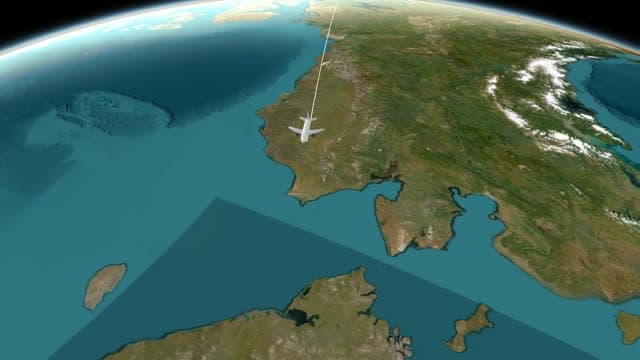
New York to Tokyo Flight
A 3D airplane model crosses the Pacific on a rotating globe, camera locked to the route.
- Engine:
- Globe
- Map Style:
- Satellite
- Aspect Ratio:
- 16:9
Prompt used for this videoOn a 3D globe, fly a 3D airplane model from New York to Tokyo across the Pacific, following the route with the camera, then keep rotating the globe so the plane goes over the horizon to the far side.
A flight line between any two places
A flight is a Route action in Air/Direct mode. Fill in From and To, add a waypoint for each stopover, and the line draws leg by leg. An air leg has a Curvature setting, so the line can bow like a flight arc or run straight.
Colour, width, opacity and pattern are set per leg, and a dashed line is the classic look for a flight. Places are matched by name, so you type cities and not coordinates.
The fastest start is a sentence: the two cities, the view (flat map or globe), whether a plane rides the line, and what to label. Animaps turns it into steps: the camera move, the route, the labels. Each step opens in the editor, where you change a city, the curve of the line or a duration without starting again.
A plane on the route
In the Head settings of the route, choose Arrow or Icon to put something at the tip of the line. Pick a plane from the icon library, or pick a 3D model. It moves with the line as the route draws.
In the clip on this page, a 3D airplane model crosses the Pacific from New York to Tokyo. The prompt that made it is shown with the clip, and you can open it in the studio and change the two cities.
Flat map or 3D globe
Short hops read well on the flat map, where both cities fit in one frame. For a long-haul flight, switch to the 3D globe: the route crosses an ocean in one shot, and the camera can keep turning the globe as the plane goes over the horizon.
The globe is included on every plan, Free included, and the clip on this page was rendered on it.
A camera that follows the flight
A route never moves the camera by itself. Add Fly along and the camera rides the line with the plane. Or frame both cities with a Fly to before the route starts, and let the flight cross a still frame.
Label each city, and end on a Pause so the destination can be read. One Route action is one journey: for a network of flights from a hub, add one action per flight, each with its own duration and style.
Example prompts to start from
These are starting points to edit, not the prompts behind the clips above. A link opens the studio and starts the generation.
- Trace a flight from London to New York with a plane icon, then add labels on both citiesTry it in the studio
- On a 3D globe, fly a plane from Sydney to Singapore to London, with a label at every stopTry it in the studio
- Start from Europe. Trace flights from Paris to Rome, from Paris to Berlin and from Paris to Madrid, then zoom out to show EuropeTry it in the studio
Questions and answers
Can I animate a flight path on a 3D globe?
Yes. Choose the globe view and the route is drawn on it, as in the New York to Tokyo clip on this page. The globe is included on every plan.
Can a plane move along the flight path?
Yes. In the Head settings of the route, choose Icon and pick a plane from the library, or pick a 3D model. It rides the tip of the line as the route draws.
Can I show stopovers, or several flights at once?
Add a waypoint for each stopover: one Route action holds up to 10 places, the start and the destination included. For separate flights, add one Route action per flight.
Does it use real flight tracks?
No. Animaps draws a route between the places you name, straight or curved. It has no live flight data and does not follow the track of a real flight.
Can I export a vertical flight animation?
Yes, vertical for Shorts and Reels or widescreen for a long video. Pick 16:9, 9:16 or 1:1 before you export and the camera frames for it. Exports are MP4 video, or a GIF for clips up to 6 seconds.
Can I make a flight path animation for free?
Yes. The Free plan exports 1080p video up to 30 seconds long, with an Animaps watermark. Paid plans remove the watermark and allow longer videos.
Plans and limits are on the pricing page.
Learn the method
- How to make an animated travel route between places
- 3D globe animation guide
- Animated travel route map guide
More map animations to make
- War map animation
- History map animation
- Travel map animation
- Map animation maker: every action and export option in one place
- Demo gallery: more clips, each with its own page
