How to Animate a Ship or Cruise Route on a Map
Animate a ship, ferry or cruise route that goes around land, port to port: set the route to Sea, add ports of call and a 3D ship. Steps, tips and prompts.
Animaps Team
Content Creator
A ship route animation draws a voyage across the sea, port to port, with a ship riding the line. In Animaps you set the route mode to Sea, and the route goes around the land instead of cutting across it. It works for cruises, ferries, trade routes and naval history.
TL;DR
Short version: Add a Route step, type the departure port and the arrival port, add a waypoint for each port of call, and set the route mode to Sea. The start and end snap to the nearest port and the line stays on the water. Pick the Sea voyage look for a dashed line, named ports and a pulse on arrival. Put a 3D ship at the tip of the line, follow it with the camera, and export.
Quick links:
- Routes, step by step: Route action guide
- A ship route in a news story: Black Sea grain corridor demo
- Ferries in a trip: Greek island hopping demo
- Travel videos: Travel map animation
This guide covers:
- Why a straight line is wrong for a ship
- How to build a sea route, step by step
- Cruises with many ports of call
- Trade routes, ferries and naval history
- Prompts you can paste
Why a Straight Line Is Wrong for a Ship
Draw a straight line from Barcelona to Venice and it crosses Italy. Draw one from Rotterdam to Shanghai and it crosses all of Asia. Viewers notice. A ship cannot sail over land, and a map that shows one doing it looks careless.
A sea route fixes this. With the route mode set to Sea, Animaps builds a path that stays on the water: around the boot of Italy, or from the North Sea down past Gibraltar, through Suez and across the Indian Ocean. You only type the ports.
How to Animate a Ship Route, Step by Step
- Open the studio. A flat map works for most voyages. Use the globe for a voyage across an ocean, where the curve of the Earth adds to the story.
- Pick a style. Satellite shows real water and coasts. A dark or vintage style suits history and trade stories.
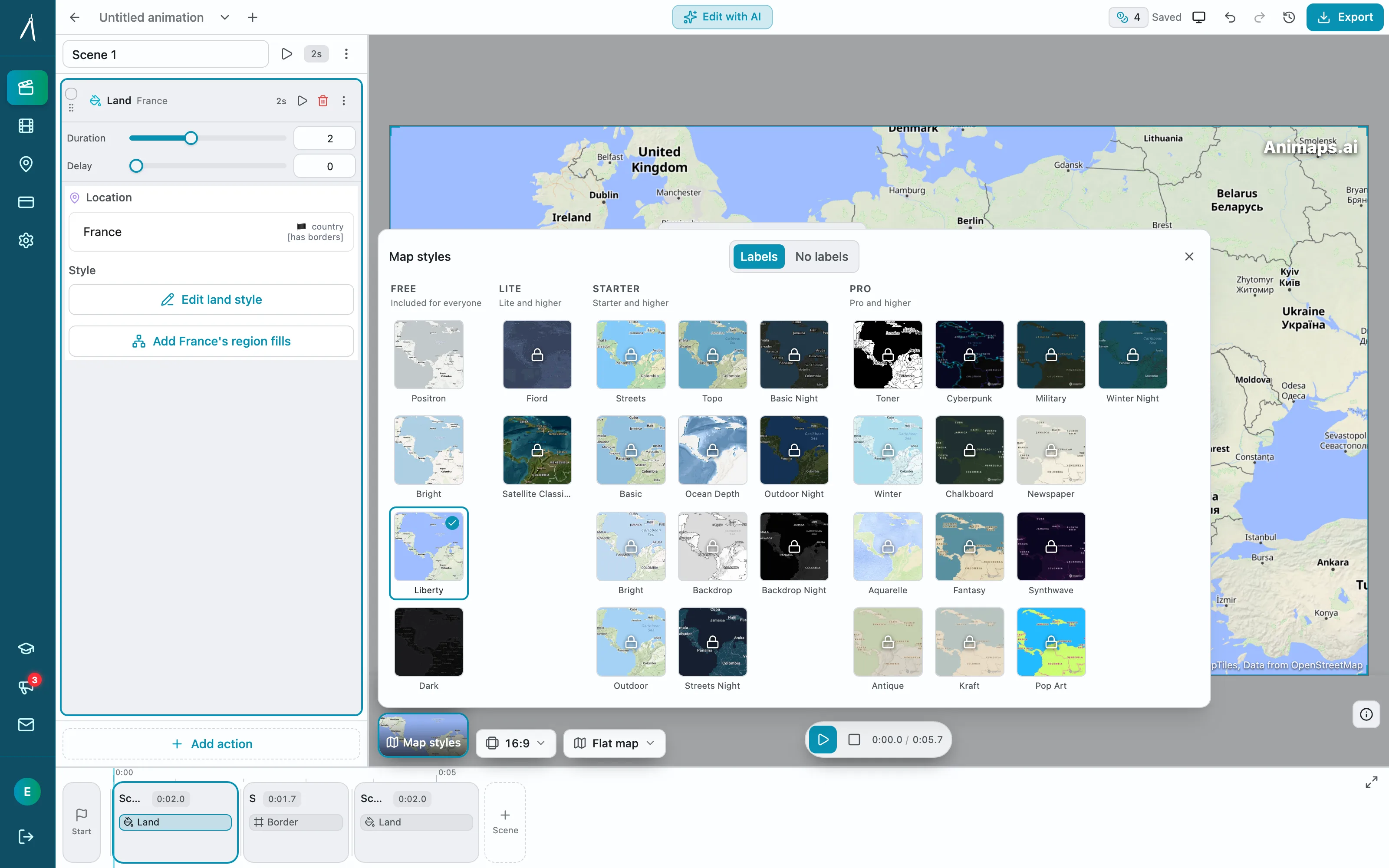
- Add a Fly to step on the departure port.
- Add a Route step. Type the departure port in From and the final port in To.
- Click + Add waypoint for each port of call.
- Set Route mode to Sea. The line now goes around land. Each end snaps to the nearest port, so "Venice" lands on the water, not in the middle of the city.
- Open Edit route style and pick the Sea voyage look. It gives a dashed line, names each port, and adds a pulse when the ship arrives.
- In the Head tab, set Head to Icon and pick a ship from the 3D quick pick row. A 3D ship turns with the route as it sails.
- Click Follow this route with the camera, so the camera rides along with the ship.
- Preview, adjust the duration, and export an MP4.
The Route action guide shows each setting in the route panel.
Cruises With Many Ports of Call
A cruise video has a rhythm: sail, arrive, name the port, sail on. Two ways to build it:
- One Route step with a waypoint per port. Fast to set up. The whole cruise draws in one go.
- One Route step per leg, with a Label and a short Pause after each. More work, but each port gets its moment on screen.
For a 7-day Mediterranean cruise, the second way works best. Give each sea leg 4 to 6 seconds and hold 2 seconds on each port. Add the day as part of the label: "Day 3 - Santorini".
Trade Routes, Ferries and Naval History
Sea routes are not only for holidays.
- Trade and shipping: a container route from Shanghai to Rotterdam through Suez, or the same voyage around Africa, with Cape Town added as a waypoint. Show both and the viewer sees the extra distance.
- News: a grain route out of Odesa through the Bosphorus, like the Black Sea grain corridor demo.
- Ferries: island hopping in Greece, the Channel crossing, the Baltic ferries.
- History: an explorer's voyage, a naval campaign, a convoy route. Put it on a vintage style for an archive look. The history map animation page has more ideas.
For historical voyages, keep in mind that the route follows today's sea lanes and ports.
Prompts You Can Paste
A cruise:
A shipping route:
On a globe, draw a sea route from Shanghai to Rotterdam through the Suez Canal, with a 3D ship. Then zoom out to show the whole route.
A ferry trip:
Show Scotland. Drive from Glasgow to Oban, then take the ferry from Oban to the Isle of Mull. Label Oban and Mull.
A news map:
Fill Ukraine with its flag. Draw a ship route from Odesa along the coast to Istanbul. Label the Bosphorus.
Tips for a Clear Sea Route
- Show the coasts. A route on open water reads better when the land around it is visible. Do not zoom so close that the coast leaves the frame.
- Use a dashed line for ships. A dashed line reads as a sea route at a glance, which is why the Sea voyage look uses one.
- Name the ports, not the seas. Viewers remember "Naples" more than "Tyrrhenian Sea".
- Slow down near the port. An Ease Out on the camera makes the arrival feel like docking.
- Keep the ship in scale with the shot. A big ship model over a small harbour hides the harbour.
To put other vehicles on a route, like planes, cars or trains, see how to move a 3D plane, car or ship along a route.
FAQ
Does the ship route go around land? Yes. With the route mode set to Sea, the route stays on the water and goes around coasts.
What happens if I type a city that is not on the coast? The route end snaps to the nearest port. If there is no port near the place, pick a coastal town instead.
Can I use a 3D ship? Yes. In the Head tab of the Route step, pick a ship from the 3D quick pick row. It rides the tip of the line and turns with it.
Can I mix sea legs with driving or flight legs? Yes. Each leg of a Route step has its own mode: Air, Car, Sea, Rail, Bike or Walk.
Can I import my cruise route from a GPS file? No. Animaps does not import GPX or KML files. You type the ports and the sea route is built between them.
Related Articles:
Keywords: ship route animation, cruise map video, sea route animation, animated ship route map, ferry route animation, shipping route map animation
Tags
Related reading
10 Ways Travel Bloggers Use Animated Maps (And How You Can Too)
Travel bloggers face a unique challenge: how do you make someone feel a journey they haven't taken? Static photos show destinations. Written stories describe experiences. But animated maps? They transport viewers into your journey, transforming passive readers into active participants following along your path. In 2026, animated maps have evolved from nice-to-have embellishments to essential storytelling tools.
Map Animation Tips for Journalists and News Creators
In today's fast-paced news environment, visual storytelling is more important than ever. Map animations help journalists explain where events are happening, show migration patterns, track conflicts, and make global news more accessible to audiences.
Map Video Maker: How to Make a Map Video Online
A map video maker turns a map into a video file you can post or edit. Here is how to make one in Animaps from a single sentence, which shape and size to pick for YouTube, Shorts or a feed, how long it should run, and what each export costs.
Browse every article in the Animaps blog.
