How to Make a Silk Road Animated Map
Make a Silk Road animated map: a caravan route from Xi'an to Istanbul, Rome in 117 or the Mongol Empire in 1259, and the sea route by Maritime mode.
Animaps Team
Content Creator
The Silk Road was not one road. It was a network of caravan tracks and sea lanes that linked China to the Mediterranean for more than a thousand years. This guide shows how to animate it in the map animation maker: a route from Xi'an to Istanbul, the empires at each end, and the cities in between.
TL;DR
Short version: Draw the overland route with the Route action, stop by stop: Xi'an, Dunhuang, Kashgar, Samarkand, Bukhara, Merv, Baghdad, Antioch and Constantinople. Put a camel icon at the head of the line and turn on 3D terrain for the mountain crossings. Fill the empires at each end with Historical fills: the Roman Empire at its peak in 117, or the Mongol Empire in 1259 for the age of Marco Polo. The border data has no outline for Han or Tang China, nor for the Parthian, Kushan or Sasanian empires in the middle, so label those by hand. Add a Maritime route for the sea Silk Road.
Quick links:
- History map animation: what the history tools can show
- Animated route between places: waypoints, route mode, head icon
- 3D globe animation: for a version on the globe
- How to make a 3D map animation: terrain and tilt
The History in Short
Trade along the routes grew after the Han dynasty sent the envoy Zhang Qian west in the second century BC. Caravans left Chang'an, today's Xi'an, went west along the Hexi Corridor to Dunhuang, then split around the Taklamakan Desert. The northern and southern tracks met again at Kashgar. From there, routes crossed the Pamir mountains to Samarkand and Bukhara, cities of the Sogdian merchants who carried much of the trade. Further west, they passed Merv, crossed Persia and reached Mesopotamia and the Mediterranean coast.
Silk went west. Horses, glass, silver, wool and many other goods went east. Ideas travelled too: Buddhism reached China along these routes, and paper making later spread west.
In the thirteenth century, the Mongol Empire ruled most of the land route. Travel along it became safer for a time, and Marco Polo made his journey to China between 1271 and 1295.
In 2014, UNESCO listed part of the network, the Chang'an to Tian-shan corridor, as a World Heritage Site.
What the Map Data Holds
We checked the historical border data before writing this guide.
- Roman Empire: snapshots from 27 BC to 383 AD, including 117 AD, its largest extent under Trajan.
- Eastern Roman (Byzantine) Empire: snapshots from 395 to 1453.
- Abbasid Caliphate: snapshots from 750 to 1060.
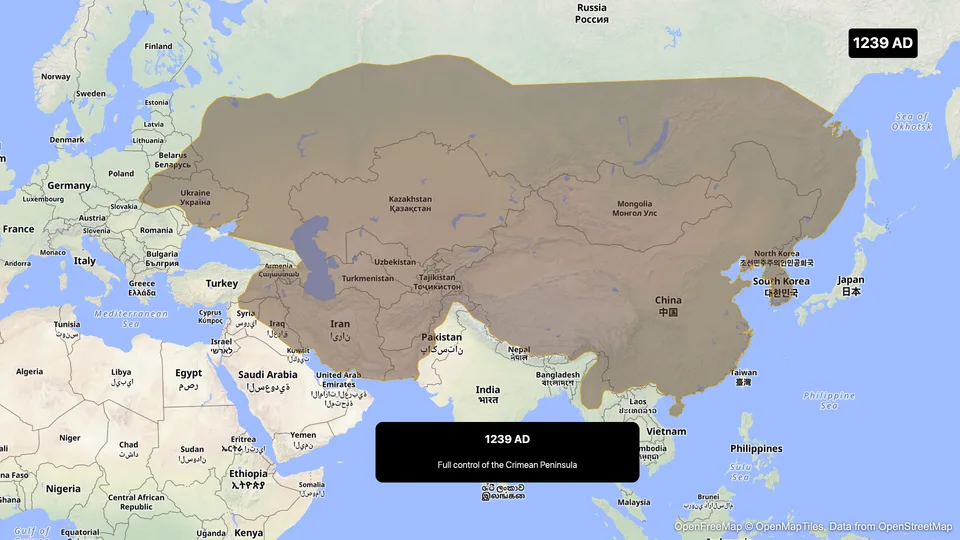
- Mongol Empire: snapshots from 1162 to 1259.
- Ming China: snapshots from 1368 onward.
- Missing: Han and Tang China, the Kushan and Sasanian empires, and the Sogdian city states. The Parthian Empire has one snapshot, for 247 BC, its founding, long before its peak.
All the cities of the route are in the place search: Xi'an, Dunhuang, Kashgar, Samarkand, Bukhara, Merv, Baghdad, Antakya (ancient Antioch) and Istanbul (Constantinople). Search the modern name, and write the old name on the label.
Plan the Video
About 45 seconds:
- Open on Xi'an with a label: "Chang'an, start of the Silk Road". 4 seconds.
- The route draws west, stop by stop, with a camel icon at the head. 20 seconds.
- The camera tilts as the route crosses the Pamir mountains, with 3D terrain on. Part of step 2.
- The Roman Empire fills in the west: "Rome, 117 AD". 6 seconds.
- A second route, by sea, from Guangzhou to the Red Sea. 10 seconds.
- A wide closing view with both routes on screen. 5 seconds.
Step by Step
- Open the studio. Pick the flat map for a classic look, or the globe for a version that turns from China to Europe. A warm style suits the topic. The Antique style, a Pro style, gives an old atlas look.
- Turn on 3D terrain. The Pamir and Tian Shan mountains show their relief when the camera tilts.
- Fly to Xi'an. Add a Label: "Chang'an (Xi'an)".
- Add a Route. Set From to Xi'an and To to Istanbul. Use + Add waypoint for Dunhuang, Kashgar, Samarkand, Bukhara, Merv, Baghdad and Antakya. That is eight legs, under the limit of nine per route.
- Set Route mode to Air/Direct. Driving would follow modern roads, which is not what you want for a caravan route. In Edit route style, set the curvature low so the legs stay almost straight, and pick a dashed or dotted pattern if you want a "track" look.
- In the Head tab, set Head to Icon and pick a camel.
- Add a Label at each big city, timed to the moment the line arrives. Short labels read best: "Samarkand", "Merv", "Baghdad, founded 762".
- Add a Land step with the source set to Historical. Search "Roman Empire" and pick the 117 snapshot. Fill it in a muted red.
- Add a second Route for the sea route: Guangzhou, Malacca, the southern tip of Sri Lanka (place it by coordinates), the Bab-el-Mandeb Strait, then up the Red Sea toward Egypt. Set Route mode to Maritime, so the line stays at sea, and a ship icon at the head.
- Zoom out for the closing shot, and export.
The Mongol Version
For the thirteenth century, swap the Roman fill for the Mongol Empire. Search "Mongol Empire" in a Historical fill and pick the 1259 snapshot, or play its growth from 1162 to 1259 with the Border timelapse. Then trace Marco Polo's land journey from Venice to Dadu (today's Beijing). By 1259, the empire stretched from northern China to Eastern Europe, so most of the land route from China to Persia sits inside one outline. That is the clearest way to show why travel became easier for a time.
Prompts You Can Start From
Type a prompt for a first draft, then check the stops and dates.
Show the Mongol Empire's borders growing from 1162 to 1259, with the year on screen.
Trace a sea route from Guangzhou past Malacca and Sri Lanka to the Red Sea, with a ship icon.
Tips for an Accurate Map
- Say "routes", not "the road". One line on screen is a simplification. A label such as "one of many routes" is enough.
- Date every label. The Silk Road of 100 AD and the Silk Road of 1300 had different empires and different cities.
- Do not show Han China with a modern China fill. Modern borders are far larger. Use a label, or draw a rough outline and mark it as approximate.
- Few merchants went the whole way. Goods passed from trader to trader. A line from end to end is the path of the goods, not of one caravan.
- Keep the pace slow in Central Asia. Viewers know Rome and China, but not Merv or Bukhara. Give those labels two seconds each.
FAQ
Can I animate the Silk Road on a 3D globe? Yes. Pick the globe view and the route draws across it. A tilted camera with 3D terrain shows the mountain crossings well.
Does Animaps have the borders of Han China? No. The border data has no Han or Tang outline. Label China by hand, or draw an approximate outline.
Can a caravan route avoid the desert? The route goes straight between the stops you set. Add waypoints along the edge of the Taklamakan, for example Turpan on the northern track, to bend it around the desert.
Can I export it for YouTube and for Shorts? Yes. Export 16:9 for YouTube and 9:16 for Shorts, Reels and TikTok.
For classroom use, read best practices for educational map animations. For an ancient story with no borders at all, see the ancient human migration map.
Tags
Related reading
How to Make a 3D Map Animation in Your Browser
A 3D map animation gives the map depth: a turning globe, a tilted camera, raised mountains, a city skyline or a plane model on its route. Animaps does all five in a browser. The globe is on every plan, Free included; 3D terrain and 3D buildings are on Pro.
Best Practices for Educational Map Animations
Educational map animations have revolutionized how we teach geography, history, and social studies. When done right, they can transform abstract concepts into visual stories that students remember long after the lesson ends.
10 Ways Travel Bloggers Use Animated Maps (And How You Can Too)
Travel bloggers face a unique challenge: how do you make someone feel a journey they haven't taken? Static photos show destinations. Written stories describe experiences. But animated maps? They transport viewers into your journey, transforming passive readers into active participants following along your path. In 2026, animated maps have evolved from nice-to-have embellishments to essential storytelling tools.
Browse every article in the Animaps blog.
